How it works
Turn a business request into
reviewable code changes.
Motionode connects the full path from request to ticket, AI-assisted planning, branch-based building, code changes, review, QA, and deployment.
Changes by ticket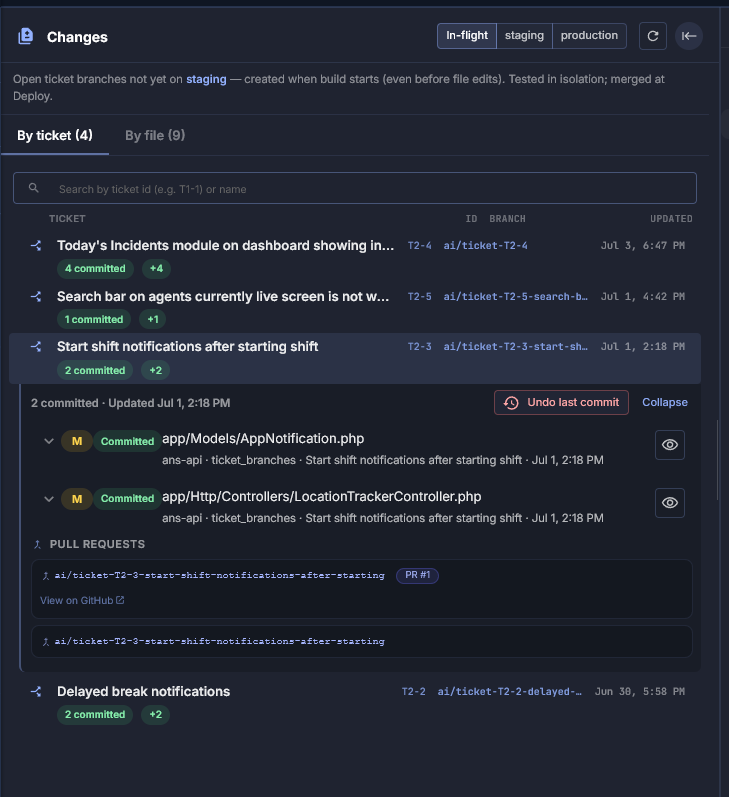
Business request to deployed code
Ticket ID attached to every branch and commit
PR and staging status visible per ticket
Undo last commit without losing ticket context
The full flow
Request to deploy, step by step.
01
Request
Business need captured.
02
Ticket
Scoped with context.
03
AI Plan
Files and steps identified.
04
Branch
Isolated, ticket-linked.
05
Code changes
Files, commits, migrations.
06
Review · QA
Human inspection, staging.
07
PR · Deploy
Controlled to production.
What stays connected
Business reason and technical change
in the same record.
Business context
Requirements, decisions, dependencies, and acceptance notes tied to the ticket.
Technical work
Branches, files, migrations, commits, and pull requests all linked to the ticket.
Delivery status
Review, staging, QA, approval, and deployment state always visible.
A ticket should not just describe work. It should carry the context, code, QA, and deployment path needed to ship safely.