Platform
Track code changes
by ticket.
Motionode connects tickets to branches, files, migrations, commits, pull requests, staged changes, and deployment status.
Changes · By ticket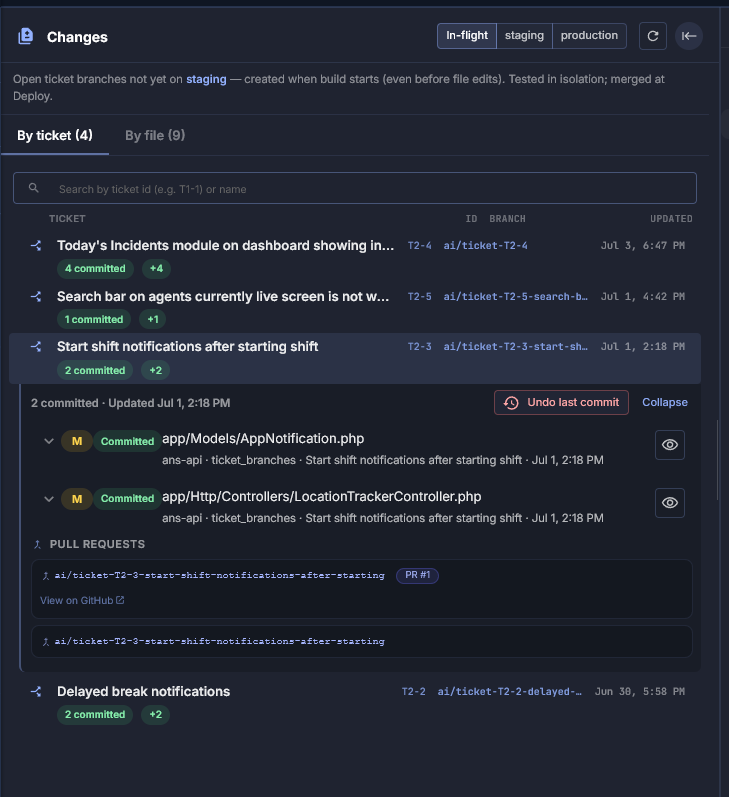
Tickets linked to code
Each branch named to the ticket that owns it
In-flight · Staging · Production tabs
4 committed files visible directly from ticket
Code diff · Commit level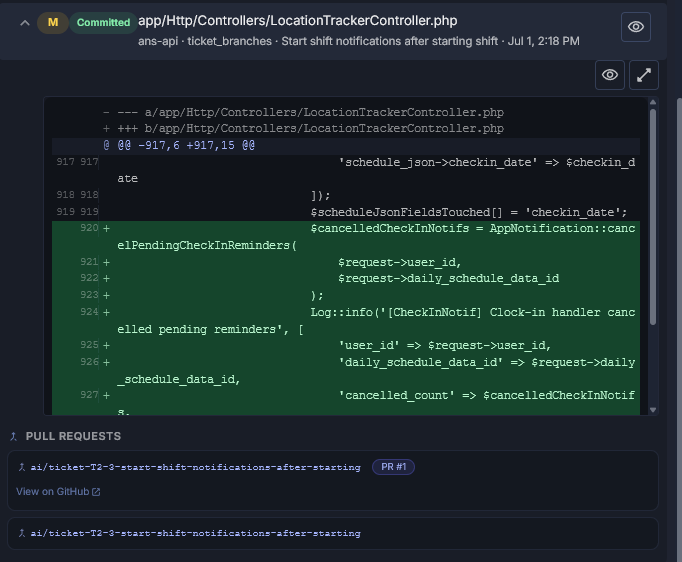
Line-level diff inside the ticket
Added lines shown in green, tracked by commit
Service and branch shown above every diff block
Pull requests linked and viewable on GitHub
What you can track
Every change connected to
the ticket that caused it.
Branches
See which branch belongs to each ticket, always visible in context.
Files and migrations
Review changed files and database migrations in the context of the ticket.
Commits and pull requests
Connect code history to the ticket that requested the change.
Deployment status
Know what is staged, ready, deployed, or still pending — per ticket.
When code changes are separated from tickets, teams lose context. Motionode keeps the business reason and technical change connected in one record.